
Free · Private · No Signup
Texas Paycheck Calculator: Find Your Exact Take Home Pay
This Texas paycheck calculator shows what actually lands in your bank account when you work in the Lone Star State. Texas charges no state income tax at all, so your paycheck only loses federal income tax, Social Security, and Medicare. Ever wonder why a Texas paycheck can look bigger than the same salary paid in California or New York? The answer is simple: the state tax line on a Texas pay stub reads zero, every single time.
- Texas state income tax is $0 on every paycheck
- Built on 2026 federal brackets and FICA rates
- Runs in your browser, nothing is stored or sent
Quick Answer
Here is the short version. Texas has no state income tax and no local income tax anywhere in the state. On a $75,000 salary, a single filer in Austin takes home about $61,593 a year, roughly 82 percent of gross pay. Only two taxes come out: federal income tax and FICA, which is Social Security plus Medicare. A good texas take home pay calculator should always show the state tax line as $0. If a tool shows Texas state tax above zero, it is wrong.
Texas Paycheck Calculator
Enter your pay and see exactly what lands in your bank account for 2026.
| Per paycheck | Per year | |
|---|---|---|
| Gross pay | ||
| Federal income tax | ||
| Texas state income tax | ||
| Social Security (6.2%) | ||
| Medicare (1.45%) | ||
| Take home pay |
Texas has no state income tax, so the state line stays at $0 on every check. Estimates use 2026 IRS brackets and the 2026 Social Security wage base of $184,500. Your real withholding follows IRS Publication 15-T tables and your W-4, so your actual check can differ by a few dollars.
The Texas paycheck calculator above takes your gross pay, pay frequency, and filing status, then subtracts federal income tax, Social Security, and Medicare to give your net pay per check and per year. Add a 401k contribution or health premium to see how voluntary deductions change the result. It works as a paycheck calculator texas workers can rely on because the state tax rate is locked at zero, just like real Texas payroll.
How to Use This Calculator
- Enter your gross salary or hourly wage.
- Pick how often you get paid, such as every 2 weeks.
- Choose your filing status: single, married filing jointly, or head of household.
- Add any 401k percentage or health premium you pay each period.
- Read your net pay per paycheck and per year, with each deduction listed.
Texas Tax Rules That Shape Your Paycheck

No state income tax, and it is in the constitution
Texas has never had a broad personal income tax, and in 2019 Texas voters approved a constitutional amendment that bans the state from creating one. Austin cannot add an income tax later without changing the state constitution. Your employer therefore withholds $0 for Texas state income tax on every check, whether you earn $25,000 or $250,000.
No local income taxes either
Some states let cities add their own income tax on top of the state tax. Texas does not. Houston, Dallas, Austin, and every other Texas city take $0 in local income tax. Your location inside Texas never changes your paycheck math.
How much tax is taken out of my paycheck in Texas?
Only federal taxes come out by law. For 2026, federal income tax uses the standard deduction of $16,100 for single filers before the brackets apply. Social Security takes 6.2 percent of wages up to $184,500. Medicare takes 1.45 percent of all wages with no cap. Voluntary items like 401k contributions and health premiums come out only because you signed up for them.
The trade off Texans accept
Texas gives up income tax revenue, so it leans on other taxes instead. Property taxes in Texas are among the highest in the United States, which matters if you own a home. The state sales tax is 6.25 percent, and local areas can add up to 2 percent more, for a maximum combined rate of 8.25 percent. Homeowners feel both sides of the deal: a bigger paycheck and a bigger yearly tax bill.
Worked Example: $75,000 Salary in Austin
Numbers make this real. Maria earns $75,000 a year in Austin, files as single, and gets paid every 2 weeks, which means 26 paychecks a year. Treat this Texas paycheck calculator example like a texas salary calculator in action: salary in, take home pay out. Her federal taxable income is $58,900, which is $75,000 minus the $16,100 standard deduction. Her federal tax is $7,670 for the year: 10 percent of $12,400 equals $1,240, plus 12 percent of $38,000 equals $4,560, plus 22 percent of $8,500 equals $1,870.
| Deduction | Per Paycheck | Per Year |
|---|---|---|
| Gross pay | $2,884.62 | $75,000.00 |
| Federal income tax | $295.00 | $7,670.00 |
| Texas state income tax | $0.00 | $0.00 |
| Social Security (6.2 percent) | $178.85 | $4,650.00 |
| Medicare (1.45 percent) | $41.83 | $1,087.50 |
| Net pay | $2,368.94 | $61,592.50 |
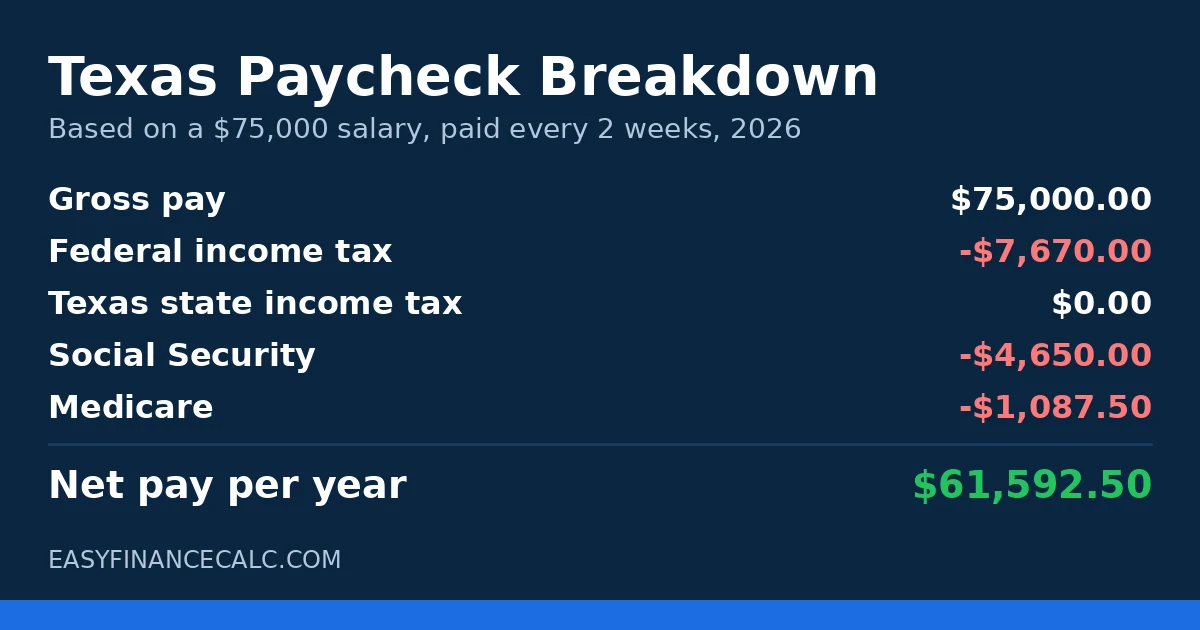
Maria keeps $2,368.94 from every $2,884.62 paycheck. Her take home pay is about 82 percent of her gross pay, and not one cent went to Texas.
Texas Paycheck Tips
Check your W-4 once a year. Your federal W-4 controls how much federal tax comes out. An old form can withhold too much or too little, and Texas has no state form, so the federal form does all the work.
Use pre tax benefits. A 401k contribution and many health premiums come out before federal tax, which lowers your taxable income. Test a higher 401k percentage in the Texas paycheck calculator above and watch the net pay change before you commit.
Moving to Texas for the tax advantage? Run your current salary through this page first. The saving is real and shows up in every check, but price in the property tax and sales tax trade off before deciding the move pays off.
5 Common Mistakes Texas Workers Make
- Expecting a state tax refund. There is no Texas income tax, so there is no state return and no state refund. Your only filing is federal.
- Copying advice from taxed states. Tips about state deductions or state W-4 forms do not apply in Texas. Check figures with a texas take home pay calculator built for Texas rules.
- Forgetting the property tax bill. New Texas homeowners often budget the bigger paycheck and forget the yearly property tax bill that helps fund the system.
- Ignoring the Social Security cap. Once wages pass $184,500 in 2026, Social Security tax stops for the rest of the year and checks get bigger. Many high earners think payroll made an error.
- Judging a job offer on gross pay alone. Two offers with the same salary can net very different amounts once benefits and pay frequency change. Compare net pay, not gross pay.
Frequently Asked Questions
Quick answers to the most common questions about the Texas paycheck calculator.
The Texas Constitution bans a personal income tax, and voters strengthened that ban in 2019. Texas employers therefore withhold $0 for state income tax on every paycheck, whatever you earn.
No. No city, county, or school district in Texas can charge a local income tax. Work in Houston, Dallas, Austin, or a small town, and your local income tax is always $0.
Only federal taxes are required. On a $75,000 salary, a single filer loses $7,670 to federal income tax, $4,650 to Social Security, and $1,087.50 to Medicare per year. That leaves $61,592.50 in take home pay. Texas adds nothing.
Texas adds no tax of its own to overtime. Overtime wages face the same federal income tax, Social Security, and Medicare as regular wages. Overtime can push part of your income into a higher federal bracket for that check, so overtime checks can look lighter than expected.
You save all of it. A California worker pays state income tax plus 1.3 percent SDI, which alone is $975 a year on $75,000. A Texas worker pays $0 in state tax and $0 in SDI, so the Texas side of the comparison is always zero.
The Texas minimum wage is $7.25 per hour, the same as the federal minimum wage. Texas has not set a higher state rate.
No. Texas has no income tax, so there is no state withholding form. You complete only the federal W-4, which sets your federal withholding.
Texas takes $0 from a bonus, just like regular pay. Federally, many employers withhold a flat 22 percent, and Social Security and Medicare still apply. Any extra withheld comes back on your federal return.
Compare net pay, not the salary headline. A solid texas take home pay calculator turns the offer into a per paycheck figure after federal tax and FICA. Then subtract real costs like health premiums.
Yes. Enter your hourly wage and hours, and the texas salary calculator logic works the same way: gross pay first, then federal tax, Social Security, and Medicare. Texas state tax stays $0 for hourly workers too.
Start with the pay stub. Check gross pay, federal withholding, and the two FICA lines, then compare them against a paycheck calculator texas workers use for a second opinion. If the numbers still clash, ask payroll to walk through each line.
What is a Texas pay calculator?
A Texas pay calculator estimates your take-home pay after federal deductions, with no Texas state income tax withheld.
How do I use a Texas pay calculator to check take home pay in my city?
Enter your salary or hourly pay, choose your pay frequency and filing status, and read the net pay result. Texas charges no state income tax, so only federal income tax and FICA come out, no matter which city you live in. In the worked example on the page, Maria earns $75,000 a year in Austin, files as single and is paid every 2 weeks, and keeps $2,368.94 from each $2,884.62 paycheck, or $61,592.50 a year.
Related Calculators
- Paycheck Calculator
- Florida Paycheck Calculator
- California Paycheck Calculator
- Salary to Hourly Calculator
Disclaimer
This page provides estimates for education only. Your actual withholding depends on your W-4, benefits, and employer payroll setup. This is not tax advice. For your own tax decisions, talk to a qualified tax professional.
Sources
IRS Publication 15-T (2026), Texas Comptroller (comptroller.texas.gov), Social Security Administration.